2019 16-inch Intel MacBook Pro with Omarchy
Eighteen MacBookPro16,1 owners show that Omarchy can run, but graphics mode determines battery life, suspend reliability and external-display behavior.
The 18-owner corpus covers MacBookPro16,1 with Radeon Pro 5300M or 5500M graphics. The later Radeon Pro 5600M configuration identifies as MacBookPro16,4 and is outside these findings.
Bottom line
Omarchy runs on MacBookPro16,1, but this is still a high-involvement T2 Linux machine. Ten Omarchy owners establish a real installation path and current desktop use; they also document repeated failed wake, a clean-install graphics hang, Touch Bar and keyboard-light failures, weak microphone input and a Thunderbolt regression. Fedora and CachyOS owners show that careful integrated-graphics setups can improve daily use, but they do not turn the machine into a macOS-equivalent laptop.
Should you use or buy it?
If you already own one, preserve a recovery path, expect to choose between integrated-graphics efficiency and easier multi-monitor or discrete-GPU use, and test two suspend cycles before trusting lid close. If you are buying used for Omarchy, this only makes sense at a steep discount and with tolerance for T2-specific maintenance. Do not apply this verdict to the Radeon Pro 5600M version.
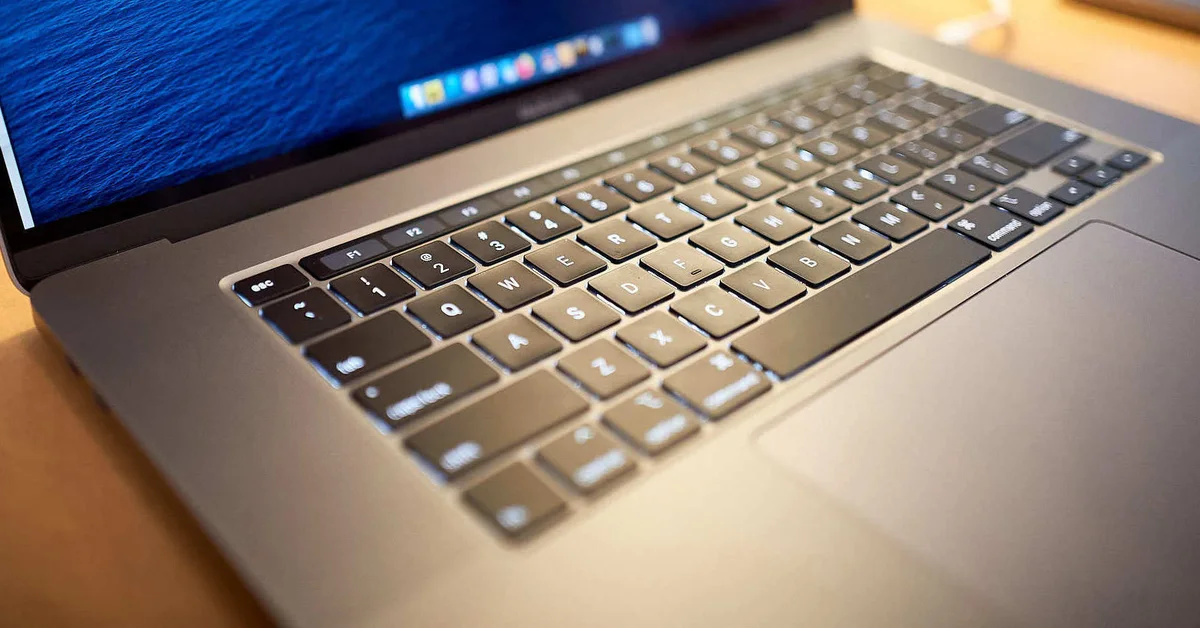
.jpg)
- Screen size
- 16 inchesSource
- Dimensions (W × D × H)
- 14.09 × 9.68 × 0.64 inchesSource
- Weight
- 4.3 poundsApple says weight varies by configuration and manufacturing process.Source
- Release
- Available Nov. 13, 2019Source
- Launch price
- $2,399Base configurationApple introduces the 16-inch MacBook Pro
- Used asking price
- $379–$672.88Mixed Core i7 and i9 configurations; most sampled asks were $434–$514 · used and refurbished · observed Sept. 2, 2026 · 8 listings2019 16-inch MacBook Pro asking-price sample
Current figures are dated asking prices, not completed sales or appraisals.
Compatibility
- Working reports
- Problems reported
- Mixed results
- Evidence, no verdict
Before you buy
Match the seller's exact model and configuration to the findings above. Check the return period, condition, included charger and delivered price before ordering.
- Check listings at ebay.com · price source checked Sept. 2, 2026
These are the sources behind the dated asking prices, not a live stock check. Searches and catalogs may include other configurations. We have not tested or endorsed individual listings.
These links are untagged; Omarchy Hardware earns no referral commission from them. How we handle commercial links.
Detailed findings
Install and boot
Omarchy's current Intel Mac path installs the T2 kernel, Apple wireless firmware, audio configuration, fan service and basic Touch Bar support. Several exact-model owners reached usable Omarchy desktops, but one clean Omarchy 4.0.2 installation hard-hung after graphical login while the internal panel remained on the Radeon GPU.
In practice A successful installer run does not establish a usable first session. Keep the documented integrated-graphics recovery available, and remember that Omarchy's supported install erases the drive after Apple's Secure Boot is disabled.
Sources MacBookPro16,1 hybrid-graphics startup report, MacBookPro16,1 Omarchy suspend owner reports, MacBookPro16,1 keyboard-backlight restore report, MacBookPro16,1 microphone gain measurement, Omarchy Intel Mac support manual
Desktop and graphics
Owners run Linux desktops with Intel graphics primary and use DRI_PRIME or a separate Radeon-first session for heavier work. The clean Omarchy 4.0.2 report instead hard-hung on the default Radeon display path, while the T2 project still rates hybrid graphics as partial because the Radeon GPU cannot be switched cleanly during a session.
In practice Intel-first is the lower-power starting point. The Radeon GPU can add performance and external-display capacity, but today it can also require a reboot or a different session and can destabilize resume.
The T2 project now documents a tested MacBookPro16,1 hybrid path. Its current guide covers Intel-first boot, DRI_PRIME offload and a reboot-bound Radeon power-off service, while retaining black-screen and power-management warnings. Project source
Sources MacBookPro16,1 hybrid-graphics startup report, MacBookPro16,1 CachyOS graphics and power report, MacBookPro16,1 Fedora T2 daily-use report, MacBookPro16,1 Radeon graphics resume failure, T2 Linux hardware support state, T2 Linux hybrid-graphics guide
Internal display and brightness
The internal panel reached graphical login on the Radeon path and a working desktop after the same owner forced Intel graphics. Fedora and CachyOS owners also report ordinary laptop use on the built-in display.
In practice The panel itself works. Black screens in this corpus occur during desktop startup or resume, so a lit login screen does not settle graphics or suspend reliability.
Sources MacBookPro16,1 hybrid-graphics startup report, MacBookPro16,1 Fedora T2 daily-use report, MacBookPro16,1 CachyOS graphics and power report, 2019 16-inch MacBook Pro technical specifications
Keyboard, hotkeys and backlight
The keyboard and basic Touch Bar function-key mode work, but exact owners report that Touch Bar presentation cannot always be made persistent, that the bar can freeze after resume and that keyboard lighting can return at zero after screensaver or suspend.
In practice Typing is supported; macOS-like automatic controls are not. Direct brightness state changes and a saved-state workaround restore keyboard lighting, while the Touch Bar can still require a reboot after sleep.
Sources MacBookPro16,1 Touch Bar mode report, MacBookPro16,1 Fedora T2 daily-use report, MacBookPro16,1 keyboard backlight after suspend, MacBookPro16,1 keyboard-backlight restore report, T2 Linux hardware support state, Omarchy Intel Mac support manual
Touchpad and pointing
The T2 project lists the trackpad as working, and owners reached ordinary desktop use. One Omarchy suspend report returned with the keyboard and trackpad dead, and the project still lacks macOS-equivalent Force Touch and palm rejection.
In practice Basic pointing is available, but input quality and post-resume recovery are separate questions. Test typing and trackpad use after repeated sleep, not only after a fresh boot.
Sources T2 Linux hardware support state, MacBookPro16,1 Omarchy suspend owner reports, MacBookPro16,1 Fedora T2 daily-use report, MacBookPro16,1 CachyOS graphics and power report, 2019 16-inch MacBook Pro technical specifications
Fingerprint and biometrics
Apple's Touch ID sensor depends on the T2 Secure Enclave, which the T2 Linux project lists as unsupported.
In practice Treat Touch ID as unavailable. Working keyboard or Touch Bar keys do not imply fingerprint support.
Sources 2019 16-inch MacBook Pro technical specifications, T2 Linux hardware support state
Wi-Fi and Bluetooth
Exact-model owners report connected daily use, and Omarchy installs the Apple Broadcom firmware used by the T2 stack. The current T2 guide warns that wpa_supplicant 2.11 can break this brcmfmac path on Arch-family systems and rates Bluetooth as partial, especially on BCM4377 hardware and congested 2.4 GHz networks.
In practice Wi-Fi has a working path, but a package update can still remove it. Keep wired or tethered recovery available, prefer iwd or the documented offload workaround if the Arch regression appears, and do not install broadcom-wl for this machine.
Sources MacBookPro16,1 Fedora T2 daily-use report, MacBookPro16,1 CachyOS graphics and power report, MacBookPro16,1 hybrid-graphics startup report, Omarchy Intel Mac support manual, T2 Linux hardware support state, T2 Linux Wi-Fi and Bluetooth guide
Speakers, microphone and audio
Internal audio can produce sound, but the exact-model reports show three different limits: an Apple BCE scheduling failure associated with random reboots, pops and dropouts with the full six-speaker DSP graph, and microphone input that was too quiet for calls before model-specific DSP processing.
In practice Do not collapse detection into a working verdict. One owner found a reduced speaker graph stable; another measured about a 15 dB microphone improvement with DSP, but that microphone setup is not packaged for Omarchy.
Sources MacBookPro16,1 Apple BCE audio reboot report, MacBookPro16,1 stable speaker-DSP configuration, MacBookPro16,1 microphone gain measurement, T2 Linux hardware support state, Omarchy Intel Mac support manual
Camera
The T2 project lists the 720p camera as working through its support stack, but none of the 18 retained owners documents a MacBookPro16,1 video-call test.
In practice Project support is encouraging, not an exact-model field verdict. Test the camera and microphone together in the application you use and again after suspend.
Sources 2019 16-inch MacBook Pro technical specifications, T2 Linux hardware support state
Suspend and resume
Four Omarchy owners in one discussion reported failed wake or incomplete input recovery. A fifth exact-model owner later reported reliable but slow resume with the same helper, while the Touch Bar still failed to restart. A separate current Radeon report ended in a forced power cycle, and a tuned Fedora owner reported that deep sleep generally worked.
In practice Suspend is possible, but not dependable enough to assume. Test repeated lid-close cycles with the GPU mode, docks and peripherals you actually use; even a successful wake can leave the Touch Bar, keyboard light or Thunderbolt unavailable.
A model-specific suspend helper now covers the known recovery sequence. The project reports better MacBookPro16,1 sleep on Omarchy and Arch, but still describes the result as short of macOS behavior. Project source
Sources MacBookPro16,1 Omarchy suspend owner reports, MacBookPro16,1 Radeon graphics resume failure, MacBookPro16,1 Fedora T2 daily-use report, MacBookPro16,1 keyboard backlight after suspend, MacBookPro16,1 repeated suspend and Radeon power report, MacBookPro16,1 T2 Linux suspend helper, T2 Linux hardware support state
External displays and docks
Owners have driven multiple external displays, including a three-monitor CachyOS setup, but the route matters. One Omarchy change broke a second Thunderbolt display until early module loading was removed. Omarchy later closed that issue as fixed or superseded by Quattro, without an exact-model owner retest. A later T2 kernel reduced a previously working second 4K stream to 1080p.
In practice External displays work, but the exact dock, cable, kernel and GPU session are part of the result. Intel graphics may struggle with several large screens; a Radeon-first session improves capacity while increasing power use and resume risk.
Sources MacBookPro16,1 CachyOS graphics and power report, MacBookPro16,1 Omarchy multi-monitor regression, MacBookPro16,1 dual-4K dock regression, T2 Linux hybrid-graphics guide, 2019 16-inch MacBook Pro technical specifications
Battery, power and thermals
The Fedora owner reduced light-use draw from 40 to 60 watts after installation to roughly 13 to 25 watts, usually 15 to 18 watts, but still reported only two to three hours of battery life. A CachyOS owner measured 18 to 20 watts while browsing with Intel graphics primary. The T2 project's Radeon-off service cut its test machine from about 20 watts to 9 watts at half brightness, but requires a reboot to restore the GPU.
In practice A working battery is not the same as laptop-like endurance. GPU state, video decoding and suspend behavior dominate the experience; use measured power draw and overnight drain rather than a desktop battery estimate.
Sources MacBookPro16,1 Fedora T2 daily-use report, MacBookPro16,1 CachyOS graphics and power report, T2 Linux hybrid-graphics guide, 2019 16-inch MacBook Pro measured review, 2019 16-inch MacBook Pro technical specifications
Daily use
The graphics choice changes the entire machine
Intel-first lowers power; Radeon-first makes heavy graphics and several displays easier
Current Linux support does not reproduce macOS's seamless switching. Owners use DRI_PRIME, a separate session or a reboot-bound service, so battery life, docking, games and suspend are consequences of the same decision.
Sources MacBookPro16,1 CachyOS graphics and power report, MacBookPro16,1 Fedora T2 daily-use report, MacBookPro16,1 hybrid-graphics startup report, T2 Linux hybrid-graphics guide
A successful wake can still be a broken wake
Touch Bar, keyboard lighting, trackpad or Thunderbolt can fail after the screen returns
The corpus includes complete black-screen failures and partial recovery. A useful suspend test therefore checks input, display, storage and dock behavior through several cycles, not merely whether the panel lights once.
Sources MacBookPro16,1 Omarchy suspend owner reports, MacBookPro16,1 Fedora T2 daily-use report, MacBookPro16,1 keyboard backlight after suspend, MacBookPro16,1 keyboard-backlight restore report, MacBookPro16,1 T2 Linux suspend helper
Audio needs three separate checks
Speaker output, microphone level and long-session stability have different evidence
The speakers can sound full and still pop or drop out, the microphone can be detected and remain too quiet for calls, and the BCE audio path has appeared in reboot traces. No single audio icon captures those distinctions.
Sources MacBookPro16,1 stable speaker-DSP configuration, MacBookPro16,1 microphone gain measurement, MacBookPro16,1 Apple BCE audio reboot report, T2 Linux hardware support state
Four Thunderbolt ports do not mean effortless docking
Video, storage, charging and networking share ports whose recovery depends on the kernel and GPU path
One Fedora owner used USB-C storage at about 600 to 700 MB/s when Thunderbolt recovery was unreliable. Multi-monitor owners likewise changed modules or sessions to keep their setups usable.
Sources 2019 16-inch MacBook Pro technical specifications, MacBookPro16,1 Fedora T2 daily-use report, MacBookPro16,1 Omarchy multi-monitor regression, MacBookPro16,1 dual-4K dock regression, MacBookPro16,1 CachyOS graphics and power report
Performance
Development and general productivity
Six or eight Coffee Lake cores, 16 GB to 64 GB of memory and fast storage remain useful
A measured Core i9 review unit sustained strong multicore performance and reached about 2.8 GB/s in its storage test. Exact Fedora and CachyOS owners use browsers, terminals and ordinary desktop applications, but no retained source provides a current Omarchy application benchmark.
Sources 2019 16-inch MacBook Pro technical specifications, 2019 16-inch MacBook Pro measured review, MacBookPro16,1 Fedora T2 daily-use report, MacBookPro16,1 CachyOS graphics and power report
Web video and several screens
Hardware decoding turned one three-monitor Intel-graphics setup from strained to usable
In the CachyOS report, enabling VA-API decoding and avoiding AV1 reduced reported CPU use from about 200% to 60%. The owner said the same three-monitor setup became much more usable. That is one exact-machine result, not a general Omarchy performance score.
Sources MacBookPro16,1 CachyOS graphics and power report, T2 Linux hybrid-graphics guide
Sustained CPU and creative work
The Core i9-9880H review unit averaged 1,407 in its macOS Cinebench R15 multicore loop
The original review found no performance loss in its combined CPU and GPU stress test and a maximum case temperature of about 42 C. Those measurements establish the chassis's original capacity; Linux audio, graphics switching and suspend remain separate workflow risks.
Sources 2019 16-inch MacBook Pro measured review, MacBookPro16,1 stable speaker-DSP configuration, MacBookPro16,1 Radeon graphics resume failure
Games and 3D work
The Radeon GPU is usable through DRI_PRIME, but access and battery efficiency are not seamless
The CachyOS owner runs Steam games on the Radeon GPU while keeping Intel graphics primary. The measured Radeon Pro 5500M review shows credible older 1080p-class performance, but its Windows and macOS results are not Omarchy frame rates and do not settle current driver stability.
Sources MacBookPro16,1 CachyOS graphics and power report, 2019 16-inch MacBook Pro measured review, T2 Linux hybrid-graphics guide, MacBookPro16,1 Radeon graphics resume failure
Changes over time
-
Repeated suspend exposes an early Radeon recovery limit
One suspend and resume completed; the next rebooted the machine. Forcing the Radeon power state high after wake improved that older T2 stack's behavior.
Sources MacBookPro16,1 repeated suspend and Radeon power report
-
Four Omarchy owners report failed or incomplete wake
Across Omarchy 3.2-era reports, the screen stayed black, the machine powered off or the keyboard and trackpad failed to return normally.
-
Touch Bar default mode fails to persist
Function keys and the Fn toggle worked, but the requested media and brightness presentation did not become the default.
-
Direct control restores keyboard lighting after suspend
A Fedora owner found the keyboard backlight off after wake and restored it by writing the brightness value directly.
-
Omarchy Thunderbolt change breaks a second display
Early Thunderbolt module loading reduced one two-monitor setup to a single display; removing the change restored both.
-
Apple BCE audio failure appears in random reboot traces
One Ubuntu owner reproduced the scheduling failure on two T2 kernel versions while investigating otherwise unexplained reboots.
-
Intel-first Fedora setup lowers power and restores deep sleep
After tuning, one owner reported 13 to 25 watts during light use and generally working deep sleep, with Touch Bar and Thunderbolt failures still remaining after wake.
-
A fifth Omarchy owner gets reliable but incomplete resume
The model-specific helper resumed reliably but slowly for this owner, while the Touch Bar returned in a broken state and its service would not restart.
-
Omarchy closes the Thunderbolt issue under Quattro
The project marked the regression fixed, resolved or superseded by its current Quattro implementation. No exact-model owner retest is recorded in the thread.
-
Reduced speaker DSP graph avoids pops and dropouts
The full six-speaker profile glitched on one machine; the owner documented a smaller graph that remained stable in that setup.
-
Second 4K stream regresses on a T2 kernel
A dock that drove two 4K displays on kernel 6.18.44 limited the second stream to 1080p on 7.1.8.
-
Radeon resume fails and requires a hard power cycle
Kernel traces showed a fatal GPU reset failure after lid-close suspend on a Radeon Pro 5500M system.
-
Model-specific DSP raises microphone level
An Omarchy owner measured about a 15 dB increase over the raw microphone path without clipping, but the dependency was not packaged for Arch or Omarchy.
-
Saved brightness state fixes a zero-level restore
An Omarchy 4.0.1 owner traced the dark keyboard after screensaver or suspend to a stale brightness value and confirmed a seeded-state workaround.
-
Clean Omarchy 4.0.2 install hard-hangs on Radeon graphics
The machine reached graphical login but froze after the session started until Intel graphics was forced as primary.
Sources
Omarchy reports are direct results. Arch, Arch-based and other Linux reports are labeled separately and used only as evidence of hardware or driver behavior that may carry over. Shared-identifier and related-model reports are context and do not enter the exact-model count.
- MacBookPro16,1 Touch Bar mode reportOpen source
Field report on GitHub · Omarchy · Oct. 25, 2025
Exact model, T2 kernel, driver and the distinction between working Fn toggle and ineffective default mode. A newer MacBookPro16,3 result is related-model context, not a MacBookPro16,1 retest.
- MacBookPro16,1 hybrid-graphics startup reportOpen source
Field report on GitHub · Omarchy · Sept. 1, 2026
Exact model, Omarchy 4.0.2, both GPUs, hard-hang sequence and integrated-graphics recovery.
- MacBookPro16,1 Omarchy multi-monitor regressionOpen source
Field report on GitHub · Omarchy · Dec. 16, 2025
Exact model, dock, two-monitor setup, update regression and owner-confirmed rollback. Omarchy closed the issue July 18, 2026, as fixed, resolved or superseded by Quattro, but the thread has no exact-model owner retest.
- MacBookPro16,1 Omarchy suspend owner reportsOpen source
Field report on GitHub · Omarchy · Sept. 21, 2025
Five exact-model or unambiguous A2141 owners: four report failed or incomplete wake, while one later reports reliable but slow resume with a broken Touch Bar state.
- MacBookPro16,1 keyboard-backlight restore reportOpen source
Field report on GitHub · Omarchy · Aug. 30, 2026
Exact model, Omarchy 4.0.1, observed zero-brightness restore and owner-confirmed saved-state workaround; only the anchored comment qualifies.
- MacBookPro16,1 microphone gain measurementOpen source
Field report on GitHub · Omarchy · Aug. 27, 2026
Exact model and direct before-and-after PipeWire measurements in two calling applications; the DSP workaround is not packaged by Omarchy.
- MacBookPro16,1 Radeon graphics resume failureOpen source
Field report on GitHub · Arch-based · Aug. 22, 2026
Exact model and GPU, lid-close failure, kernel traces and forced-power-cycle recovery. The report names an Arch and Omarchy environment but does not identify the installed distribution clearly enough for the direct Omarchy lane.
- MacBookPro16,1 stable speaker-DSP configurationOpen source
Field report on GitHub · Arch-based · Aug. 3, 2026
Exact model, observed full-profile glitches and one owner's stable reduced DSP graph.
- MacBookPro16,1 CachyOS graphics and power reportOpen source
Field report on Reddit · Arch-based · Aug. 4, 2026
Exact model, Intel- and Radeon-first sessions, power draw, Steam use, hardware video decoding and owner-confirmed three-monitor improvement.
- MacBookPro16,1 dual-4K dock regressionOpen source
Field report on GitHub · other Linux · Aug. 11, 2026
Exact model, GPU, dock, displays and before-and-after T2 kernel versions.
- MacBookPro16,1 Apple BCE audio reboot reportOpen source
Field report on GitHub · other Linux · March 1, 2026
Exact model, Ubuntu and a repeated kernel failure across two T2 kernel versions.
- MacBookPro16,1 Fedora T2 daily-use reportOpen source
Field report on Reddit · other Linux · June 23, 2026
Exact 2019 16-inch configuration, before-and-after power draw, battery estimate, deep sleep, Touch Bar, Thunderbolt and USB-C results.
- MacBookPro16,1 keyboard backlight after suspendOpen source
Field report on GitHub · other Linux · Nov. 3, 2025
Exact-model Fedora report of keyboard-backlight failure after suspend and direct sysfs recovery; comments from other models are excluded.
- MacBookPro16,1 repeated suspend and Radeon power reportOpen source
Field report on GitHub · other Linux · June 23, 2022
Exact-model firsthand result from an older driver stack, retained only as dated change-history evidence.
- 2019 16-inch MacBook Pro technical specificationsOpen source
Manufacturer specification on Apple · Nov. 13, 2019
Official processor, memory, storage, display, battery, input, camera, audio, wireless and port configuration record.
- 2019 16-inch MacBook Pro measured reviewOpen source
Original measured review on Notebookcheck · Dec. 10, 2019
Independent Core i9 and Radeon Pro 5500M review with display, CPU, storage, graphics, thermal, power and battery measurements under macOS and Windows.
- Omarchy Intel Mac support manualOpen source
Project documentation on GitHub · Aug. 30, 2026
Current project record for destructive installation, Secure Boot, automatic T2 packages, Apple firmware, fan service and Touch Bar setup; unsupported performance marketing is excluded.
- T2 Linux hardware support stateOpen source
Hardware support project on T2 Linux · Sept. 2, 2026
Current project matrix for input, wireless, camera, audio, Touch Bar, Secure Enclave, suspend and hybrid-graphics support; not an owner report.
- T2 Linux hybrid-graphics guideOpen source
Hardware support project on T2 Linux · Sept. 2, 2026
Project-tested MacBookPro16,1 guidance for Intel-first graphics, DRI_PRIME, Radeon power control, displays and known wake limitations.
- T2 Linux Wi-Fi and Bluetooth guideOpen source
Hardware support project on T2 Linux · Sept. 2, 2026
Current Apple-firmware and brcmfmac setup plus the Arch-family wpa_supplicant regression and Bluetooth limits; not an exact-model field result.
- MacBookPro16,1 T2 Linux suspend helperOpen source
Hardware support project on GitHub · Aug. 30, 2026
Model-specific Omarchy and Arch project covering deep sleep, integrated graphics and post-resume panel, backlight and Touch Bar recovery; project verification, not an owner count.
- T2 EndeavourOS MacBook model support recordOpen source
Hardware support project on T2 Linux · April 12, 2026
Project release record identifying the Radeon Pro 5600M configuration as MacBookPro16,4, separate from the MacBookPro16,1 report corpus.
- Apple introduces the 16-inch MacBook ProOpen source
Manufacturer specification on Apple · Nov. 13, 2019
Official availability date and base launch price.
- 2019 16-inch MacBook Pro photographOpen source
Product photograph on Wikimedia Commons
Photograph by Jack Baty, licensed CC BY-SA 2.0. Resized and converted to WebP.
- 2019 16-inch MacBook Pro asking-price sampleOpen source
Dated market snapshot on eBay · Sept. 2, 2026
Eight active exact-generation seller asks across mixed Core i7 and i9 configurations. The range is not a sold-price estimate.